
Tired of using the official Instagram app with its limited features and strict restrictions? Instander APK is your way to go. It’s an enhanced version of the original Instagram app that allows you to download photos, IGTV, reels, and videos.
Not only that, you can also copy the comments, bio, and description without getting distracted by a single ad. Let’s learn how to download the Instander pro APK and what other exciting features it has for you.
Instander APK Specifications
Name
Version
Android
Size
Updated
Pricing
What’s Instander APK?
Despite having 2 billion active users, Instagram shows restraint when it comes to offering you the features you need. You can’t download the posts, reels, or even copy the comments, bios, and so on.
The Instander APK is a full-fledged clone of Instagram that comes with lots of exciting features that solve all of your problems. Like, it allows you to download any reels, videos, or posts that you get to see. Not only that, it has Ghost Mode for anonymous browsing, an ad-free user interface, and the ability to post content without compression in high quality.
It also includes advanced features like active follower insights, full-screen profile viewing, archive saving, and theme customization. The Instagram mod is created by a well-known developer, The Dise, so it is known as Instander by Dise.
Instander APK Clone And Unclone
There are two types of Instander APK. If you install the Instander Unclone, you need to uninstall the original Instagram from your phone first. With the Instander Clone APK, you can keep the original one as well and use both together. Let’s get to the difference in detail:
Clone
Unclone
Instagram VS Instander APK
See how Instagram compares with Instander APK through this comparison table:
| Features | Instander APK | |
|---|---|---|
| Download Photos, Videos & Stories | ❌ Requires third-party apps | ✅ Built-in downloader for reels, stories, IGTV, and posts |
| Ad-Free Browsing | ❌ Sponsored ads in feed & stories | ✅ 100% ad-free experience |
| Anonymous Story Viewing (Ghost Mode) | ❌ Not available | ✅ View stories, lives, and messages without being seen |
| Custom Font, Emojis & Themes | ❌ Limited customization | ✅ Full customization options including themes and emojis |
| Media Upload Quality (HQ Media) | ❌ Auto compression on uploads | ✅ Upload media in high quality |
| Media Playback Control (Stop Autoplay) | ❌ No control over auto play | ✅ Disable auto play to save data |
| Privacy Control for Replies | ❌ Limited control | ✅ Control who can reply; everyone, followers, or no one |
| Save to Archive | ✅ Only stories | ✅ Stories, posts, and live videos (private archive) |
| Close Friends List | ✅ Available | ✅ Fully available with easy customization |
| Hide Stories from Specific Users | ✅ Available | ✅ Same, with additional privacy features |
| Crash Report Toggle | ❌ Always sent automatically | ✅ Enable/disable crash reporting manually |
| Disable Analytics Tracking | ❌ Always active | ✅ Option to completely disable analytics tracking |
| App Icon & Name Customization | ❌ Not available | ✅ Different app name (Instander) and icon in the Clone version |
| Wide Search Content | ✅ Limited by algorithm | ✅ More diverse, trending, and discoverable content |
| Active Follower Checker | ❌ Requires third-party tools | ✅ Built-in feature to find active followers |
| Facebook Story Sharing | ✅ Available | ✅ Fully supported |
| Messaging & Typing Privacy | ❌ Shows when you’re typing or online | ✅ Read messages & type without being seen |
| Multiple Account Compatibility | ✅ Fully supported | ✅ Same support as an official app |
| App Updates | ✅ Regular via the Play Store | ✅ Manual updates required via APK download |
Why Use Instander Android APK?
Many of you may wonder, Why is it worth using Instander as a pro version of Instagram? It’s because it’s a comprehensively improved version of the Instagram Meta. It includes every feature that would keep you from going to different websites and wasting time.
Any reel, video, picture, or post you like, downloading it usually means searching for external tools, which is a hassle. But with this modded Insta version, you get a built-in Instagram downloader. Whatever post you come across, you can not only download it, but if it’s text-based, you can also copy it and share it on your wall.
And you can even copy the comments of the post and the bios of other users. If you need to have more control over your Instagram, want to customize it, browse anonymously, or download whatever you want, then using this enhanced Instagram version is your best bet.
Is It Safe To Download And Use?
TheDise, a well-known software developer, created this unlocked Instagram APK. Hence, it’s 100% secure and safe to use. Modern security measures and high-level encryption are built-into the app to keep it protected from all cyber threats.
If you create your account on it, don’t worry about your data being leaked or misused. The system is secure in every way.
We’ve also tested it using VirusTotal, one of the best virus testers, and no virus was detected. This proves how secure this app is.
Features
The app has many awesome features that make it a premium Instagram clone despite being free to use.
Built-In Downloader
This modified version comes with a built-in downloader with which you can directly download the post, reel, video, or even IGTV that you come across. No more third-party apps needed to do that. The best part?
Every content that you download is in high resolution, which makes it immersive to watch. All you have to do is click on the three dots on a photo or a video, hit “Download,” and the content will be downloaded.
Settings Of Download Option
Feed and Stories
You have many restrictions on the official Instagram when it comes to posting feeds and stories. With the Instander APK latest version, you can disable the 60-second stories and make only the ones that are 15 to 30 seconds visible. This way, it helps you save a lot of time that you’d spend watching longer stories.
Furthermore, it also gives you a story-flipping feature that you can activate or deactivate. When you disable it, once the story is completed, it won’t flip automatically.
Disable Autoplay Videos
The videos on Instagram auto-play as soon as you get to them while scrolling. That consumes a lot of your data. But with this Instagram mod APK, you can disable auto-play for videos, and they’ll never play by themselves, saving your data.
Disable Suggestion Friends
The friend suggestions can be annoying sometimes, especially when they’re way too frequent. You can easily disable the suggested friends feature on this modified Instagram with ease. No more suggestions and a peaceful browsing experience.
Indicator “Follow You”
It’s an amazing feature that, if you enable it, will show the message on your followers’ profiles that they follow you. It’ll make it easier for you to know who follows you and who doesn’t.
In App Browser
With the in-app browser of the APK, you never have to leave the app even when you need to open any links. Just click the links and they’ll open right in the app, not in any external browsers that take you out of the app.
Ghost Mode
Want to browse anonymously without your friends knowing? You can do that now with this Pro Instagram APK. It gives you Ghost Mode, which you can enable and mark yourself as the host.
Nobody will know your identity, no matter what activities you do on the app. When you enable this feature, there are 4 options you can select to enable or disable.
Settings Of Ghost Mode
Copy Anything
No matter whether it’s a bio, captions, comments, or even the description, you can copy everything on the Instander Mod APK latest version. You don’t need any other external tool to do that. Whatever you like, just select it, copy it, and paste it wherever you want.
No-Ads
What makes this Insta-modded app better than others is that it doesn’t show you any ads. The interface is fully clean, and you don’t get to see any pop-ups, banners, or annoying ads. You browse without any distractions.
Additional Features
The app also has these incredible features:
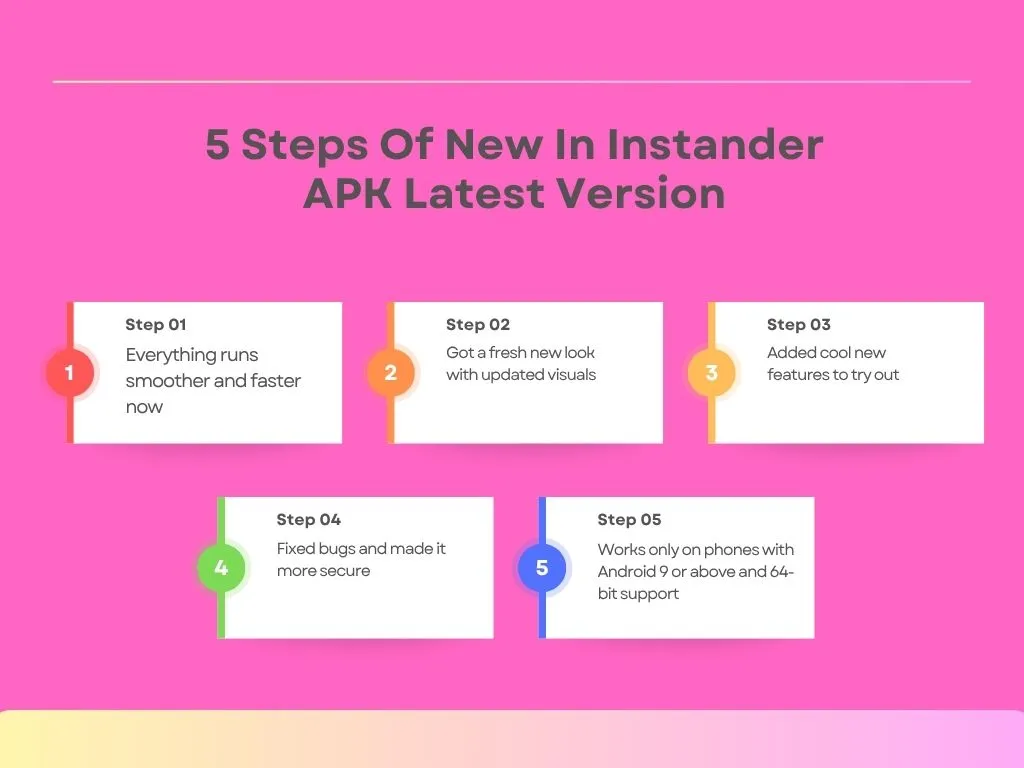
What’s New In Instander APK Latest Version?
These are the changes made in the latest version of Instander download:
Pros And Cons
These are the pros and cons of this Instagram Mod APK:
Pros
Cons
How To Download Instander APK?
Follow this step-by-step guide to download the Instander APK with ease:
Instander For Android
This is how to download the Instander app on Android devices:
Instander For PC
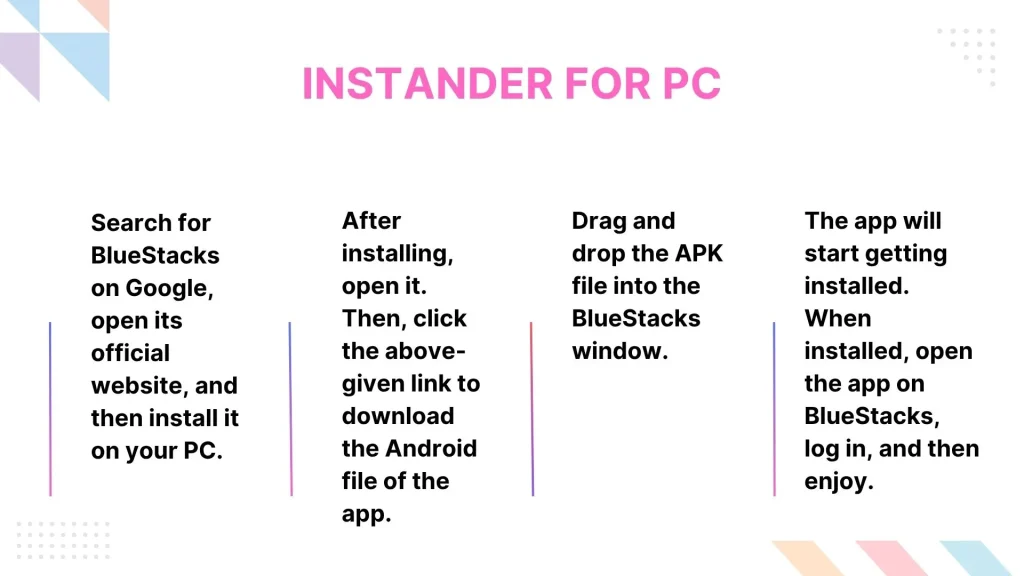
There isn’t any Instander PC version available yet. It’s only launched for Android devices. But with an Android emulator like BlueStacks, you can still download and use this app on your PC. Here’s how to download the Instander app on PC using the emulator.
Instander for iOS:
Unfortunately, the iOS version of this app hasn’t been launched yet. This is because of the strict security restrictions on iOS devices. So, it’s not possible to download Instander on iOS right now.
How To Use This Modded Instagram?
Let’s learn how to use this Insta mod APK and get the most out of its features:
Downloading Photos And Videos
Follow these steps:
Using the iOS Emojis
You don’t need an iPhone to use iOS emojis anymore, as this app lets you use them on your Android too. Here’s how to use iOS emojis on your Android with the Instander app:

How To Backup or Restore Settings?
Want to quickly set up Instander’s settings like UI, fonts, and other customizations? Here’s how to back up and restore the settings so you can easily configure them in your app:
How to Update Instander?
Updating the app is very easy, as it gives you a notification on your screen whenever an update is available. All you have to do is click on the update notification, and the update will start automatically.
Troubleshooting Some Common Issues
There have been two of the most common issues that users have reported about this Insta mod app. Let’s learn how to troubleshoot both:
“App Not Installed Error”
You download the app, try installing it, but get this annoying error. You can easily fix it by following these simple steps:
Latest Version Not Working
The latest Instander app version isn’t working on your device. Why’s that? It could be due to low storage, cached data, or an unstable internet connection. Follow these steps to fix it.
Alternatives To Explore
The following Instagram mod apps are similar to Instander. You can explore them, too.
Final Words
Instander APK is a modified version of Instagram that comes with extra features, including a built-in downloader, iOS fonts/emojis, customization options, ghost mode, and multiple themes to choose from. Furthermore, the app has frequent updates, the ability to enable or disable typing status, and lets you watch stories and live streams anonymously.
This app is created by a well-known developer, TheDise, which ensures the app is secure, easy to use, and solves every single problem for users. It’s also ad-free, so you won’t get distracted while browsing.